
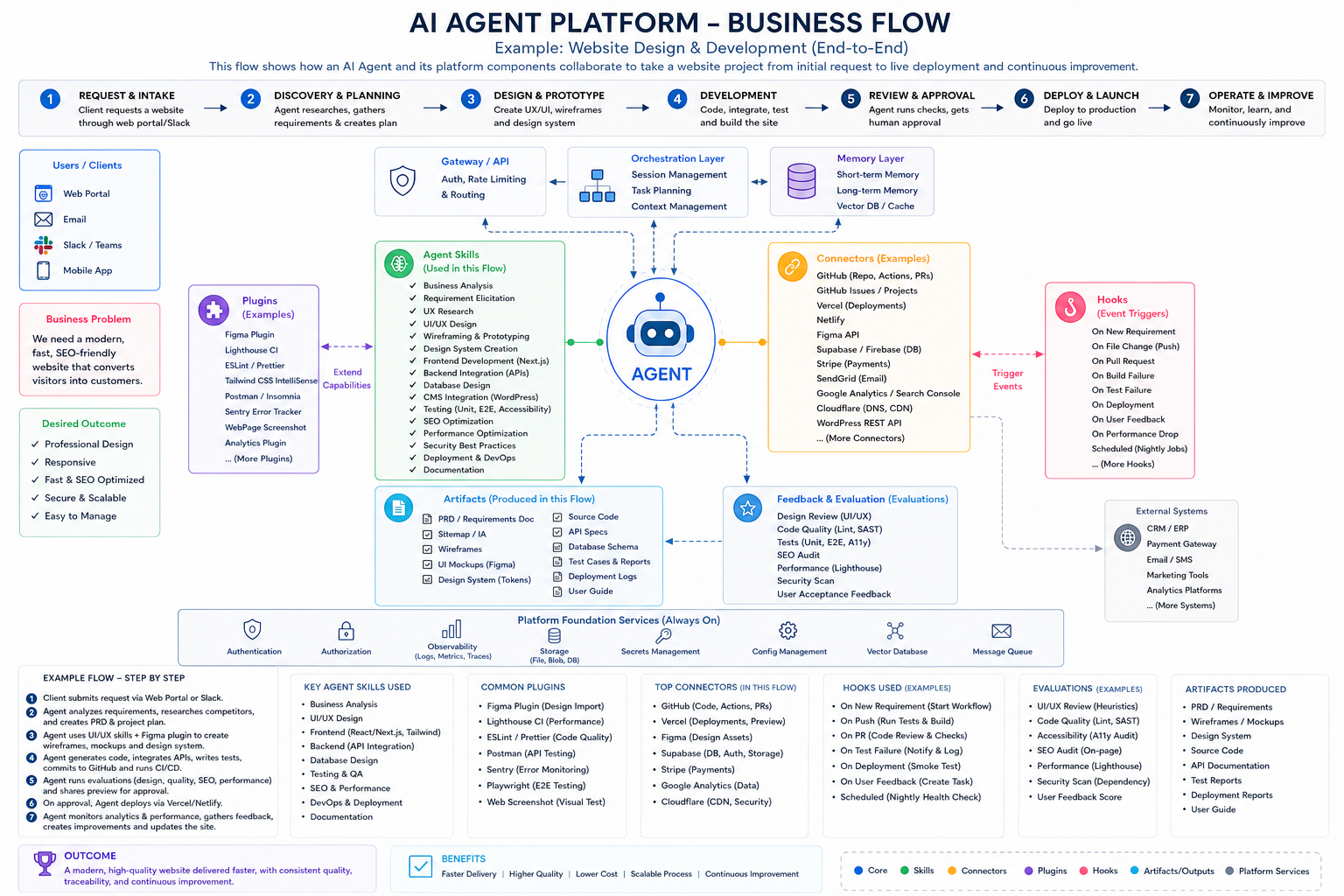
AI agent platform business flow: a website design and development example showing how platform components collaborate from the initial request to deployment and continuous improvement. Product implementations vary, so treat this as a mental model rather than a literal diagram of Anthropic's internal systems.
Architecture terms in plain English
| Terms | Description |
|---|---|
| Agent | The decision-making worker that understands the website goal, plans the work, selects capabilities, acts and reviews results. Examples: planning the site build or deciding to fix failed accessibility tests before deployment. |
| Agent Skills | Reusable expertise and instructions that teach the Agent how to perform a type of work. Examples: applying a UI/UX design process or following React, SEO and accessibility standards. |
| Tools | Actions the Agent can perform while completing the workflow. Examples: editing source files and running Playwright tests, or searching the web and generating a design image. |
| Connectors | Controlled connections to external systems and data used by the Agent. Examples: reading Figma designs and GitHub issues, or deploying through Vercel and reading Google Analytics. |
| Plugins | Installable packages that bundle Skills, Tools, connectors, Hooks, agents or other resources. Examples: a Figma design plugin or a website-quality plugin combining Lighthouse, testing and reporting. |
| Hooks | Automatic lifecycle triggers and controls around Agent activity. Examples: running tests after a Git push or creating a repair task when a production health check fails. |
| Artifacts | Persistent outputs produced during the website workflow. Examples: requirements, wireframes and design tokens, or source code, API specifications and deployment reports. |
| Memory | Information retained across interactions so the Agent can continue with relevant project history. Examples: the approved design direction or a client's preferred CMS and earlier decisions. |
| Knowledge / Context | Information available to the Agent for its current reasoning and decisions. Examples: the requirements document and existing codebase, or brand rules, analytics and API documentation. |
| Models | AI reasoning engines selected for different parts of the work. Examples: a capable model for architecture and coding, or a specialised model for image generation and visual analysis. |
| Sub-agents | Specialised Agents delegated a bounded task by the main Agent. Examples: an SEO Agent researching keywords or an Accessibility Agent auditing the finished interface. |
| MCP | Model Context Protocol is a standard interface through which Agents discover and use external tools, data and services. Examples: an MCP server exposing Figma assets or approved database queries. |
| Evals / Evaluations | Automated checks that determine whether the website meets defined requirements. Examples: Lighthouse performance thresholds or tests for code correctness, SEO and WCAG accessibility. |
| Guardrails / Policies | Rules defining what the Agent may and may not do. Examples: never expose secrets and require approval before production deployment or database migration. |
| Permissions | Access controls defining the resources and actions available to the Agent. Examples: read-only Figma access or GitHub permission to create a branch and pull request but not merge it. |
| Observability | Visibility into the Agent's execution, quality, cost and failures. Examples: tracing tool calls and model usage or monitoring deployment errors, latency and test failures. |
| Orchestration | The coordination layer that orders tasks and chooses when to use a Skill, Tool, retry or delegate. Examples: completing design before development or assigning SEO and accessibility work to Sub-agents. |
| Human-in-the-loop | Human review or approval at consequential decision points. Examples: approving the design system before coding or authorising the pull-request merge and production launch. |
| CI/CD | The automated pipeline that builds, tests and deploys the website. Examples: GitHub Actions checking every pull request or Vercel publishing an approved production build. |
| Feedback | Evidence showing how well the delivered website performs for users and the business. Examples: client comments and conversion rates, or analytics, error reports and Core Web Vitals. |
| Event / Trigger | An occurrence that starts or resumes an Agent workflow. Examples: a new website request, pull request or failed build, or a scheduled performance check detecting a threshold breach. |
| Security | Protection for the Agent, data, tools and execution environment. Examples: authentication, sandboxing and secrets management, or policy enforcement and audit logs. |
Agent Skills vs Connectors vs Plugins
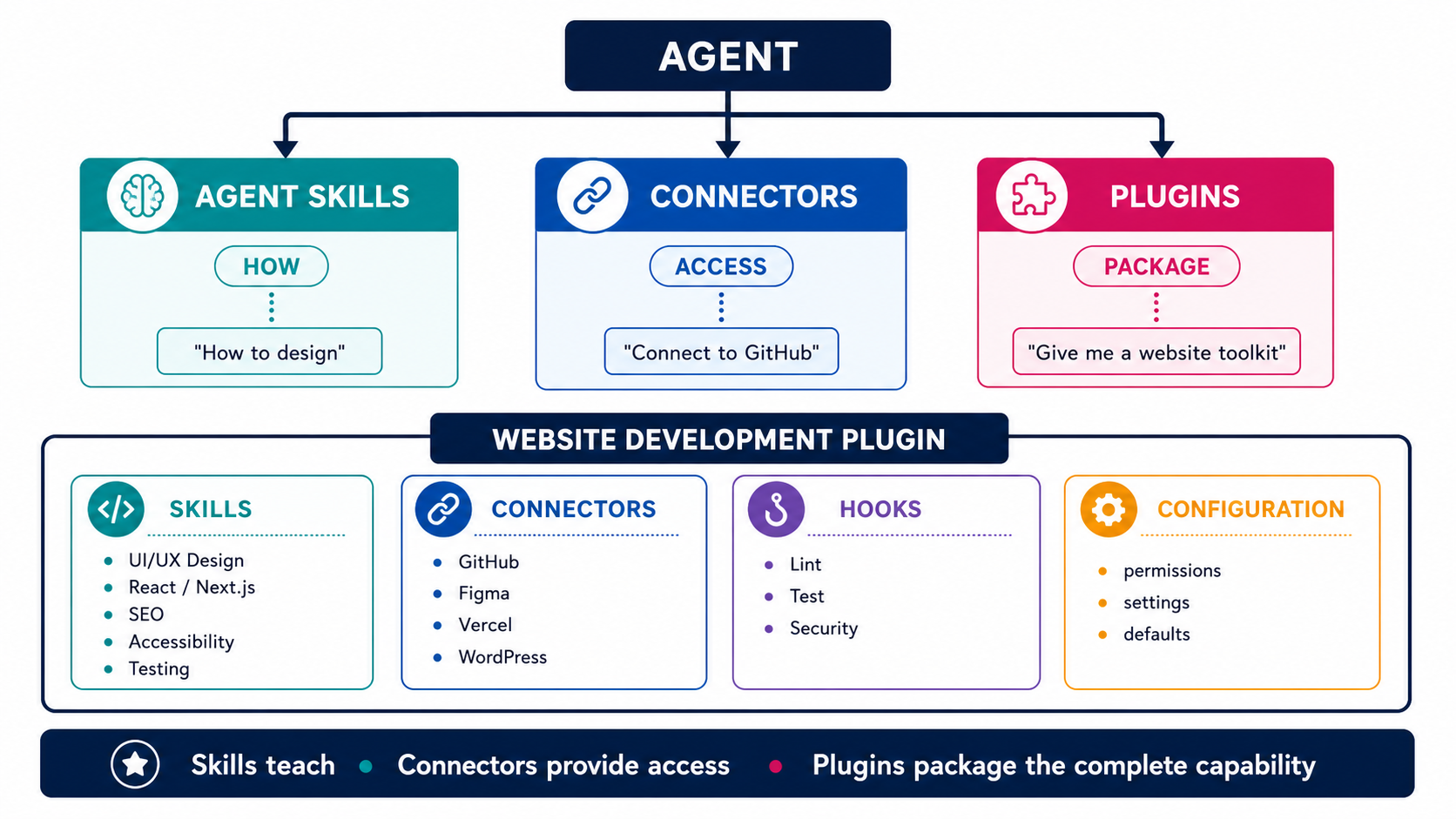
Skills teach the Agent how to perform work, connectors provide controlled access to external systems, and plugins package related capabilities for installation and reuse.
| Aspect | Agent Skills | Connectors | Plugins |
|---|---|---|---|
| What is it? | Reusable expertise and instructions for the Agent. | A connection or interface to an external system. | A packaged capability or bundle installed as one unit. |
| Question answered | How should I do this? | Where and how can I access it? | Which capabilities should I install together? |
| Primary purpose | Improve the Agent's knowledge, judgement and execution approach. | Give the Agent controlled access to external data, services and actions. | Distribute a complete, reusable capability with consistent configuration. |
| Contains instructions? | Yes. Instructions are the core of a Skill. | Usually not workflow guidance. It exposes operations and schemas. | Often. A plugin can bundle one or more Skills. |
| Connects externally? | Not by itself. It can explain how to use an available connector or Tool. | Yes. External access is its main purpose. | Potentially. It can bundle MCP server configuration. |
| Can contain Skills? | Not applicable; it is the Skill. | No; a connector exposes external capabilities. | Yes. Plugins commonly bundle Skills. |
| Can contain connectors? | No, but it may document how to use them. | Not applicable; it is the connection layer. | Potentially. A plugin can package MCP integrations. |
| Can contain Hooks? | Claude Code Skills can define lifecycle-scoped Hooks, but most do not need them. | No; event automation is a separate concern. | Yes. Plugins can package reusable event handlers. |
| Relationship to Tools | Teaches the Agent when and how to use available Tools; it may include supporting scripts. | Provides external Tools or operations such as reading files, querying data or creating records. | Can package Skills, MCP Tools, Hooks, agents and supporting executables. |
| Typical format | SKILL.md plus optional references, scripts and assets. | API integration, MCP server, OAuth connection or vendor connector. | Versioned package with a manifest and folders for bundled components. |
| Typical scope | Usually one area of expertise or repeatable procedure. | Usually one external system, service or API. | Usually a complete capability or multi-component workflow. |
| Installed individually? | Often, at project or user scope; it can also arrive inside a plugin. | Configured individually or installed through a plugin. | Yes; the plugin is the installation and distribution unit. |
| Reusable across projects? | Yes, when its instructions are not tied to one repository. | Yes, subject to authentication and access scope. | Yes; portability and updates are central plugin benefits. |
| Main value | Expertise | Access | Packaging and distribution |
| Website UI example | A frontend-design Skill teaches responsive layout, typography and accessible interaction patterns. | A browser or design connector provides screenshots, page state or approved design assets. | A website-development plugin bundles design and coding Skills, browser tooling and quality Hooks. |
| GitHub example | Teaches branching, atomic commits, pull-request structure and code-review practice. | Reads repository data and can create branches, issues or pull requests within granted permissions. | Packages Git Skills, a GitHub MCP connector and pre-push or review Hooks. |
| Figma example | Teaches UI research, component design, token naming and developer handoff. | Provides access to Figma files, frames, components, variables and exported assets. | Bundles a design Skill, Figma connector and asset-processing workflow. |
| WordPress example | Teaches theme structure, block patterns, content modelling and safe update practices. | Connects to the WordPress REST API to read or update approved content. | Combines WordPress Skills, REST configuration, content validation and deployment Hooks. |
| SEO example | Teaches search intent, metadata, internal linking, structured data and content review. | Retrieves Search Console, analytics or approved keyword-research data. | Bundles SEO Skills, analytics connectors, audit scripts and reporting templates. |
| Testing example | Teaches test strategy, acceptance criteria, accessibility checks and failure diagnosis. | Provides browser, CI or error-monitoring data from Playwright, GitHub Actions or Sentry. | Packages testing Skills, browser Tools, CI connectors and post-edit test Hooks. |
| Deployment example | Teaches environment checks, release sequencing, rollback and verification. | Connects to Vercel, Netlify, AWS or Cloudflare using authorised APIs. | Bundles deployment Skills, hosting connectors, smoke-test Hooks and runbooks. |
Learning topic 01
Large language model foundations
Learning topic 02
Tokens and tokenisation
Learning topic 03
Context and context windows
Learning topic 04
Step-by-step foundations
Learning topic 05
Claude feature map
Learning topic 06
Guided full course
Learning topic 07
Power-user mental models
Learning topic 08
Official onboarding
Learning topic 09
First experiments
Learning topic 10
Productive prompting
Learning topic 11
Agentic workflows
Learning topic 12
Business and finance use cases
Learning topic 13
Claude Skills foundations
Learning topic 14
Claude Cowork foundations
Learning topic 15
Building real projects
Learning topic 16
Automation workflows
Learning topic 17
Personal productivity
Learning topic 18
Extending Claude with skills
Learning topic 19
Design and visual creation
Learning topic 20
Claude Code foundations
Learning topic 21
Claude Code Hooks
Learning topic 22
Claude Code Plugins
Learning topic 23
Advanced Skills workflow
Learning topic 24
Creator workflows
Learning topic 25
Website building workflow
Learning topic 26
Digital products and agent judgement
Learning topic 27
Expert workflow and continued learning
You do not need technical experience. Keep a real, low-risk task beside you and complete each practice activity as you progress. Features and plan availability can change, so use the linked Anthropic documentation as the source of truth for the current product.
1. Build the foundations: LLMs, tokens and context
Before learning prompt techniques, understand the three ideas that explain most of Claude's behaviour: Claude is powered by a large language model, it processes information as tokens, and it can only work with information available inside its active context.
Video lesson: getting started with Claude
1. Large language models
A large language model (LLM) is a neural network trained on patterns in large collections of data and then refined to follow instructions and behave more helpfully. When Claude responds, it does not retrieve a complete pre-written answer. It processes the available input and generates an output token by token according to learned patterns and the current conversation.
This gives an LLM broad flexibility: the same model can summarise, classify, draft, explain and transform information. It also creates important limitations:
- generated statements are predictions, not automatically verified facts;
- wording can change between runs even when the request is similar;
- the model may infer missing details incorrectly;
- fluent language can conceal uncertainty or weak evidence; and
- model knowledge, connected tools and supplied sources are different information channels.
Treat Claude as a reasoning and generation system that needs a clear task, adequate evidence and accountable review—not as a database or final authority. Anthropic's interpretability research also shows why simple claims that an LLM merely “looks up words” or reasons exactly like a person are misleading.
Is an LLM response a retrieved fact or a generated prediction?
It is generated from learned patterns and the active input. It may incorporate supplied or retrieved evidence, but the prose itself is not proof that the claims are factual.
2. Tokens
Models do not process text as pages or human-visible words. A tokeniser divides input into tokens: reusable units that may be a whole short word, part of a word, punctuation, whitespace or another text fragment. The exact split depends on the model and language.
Token counts matter because they are the units used for context limits, API usage and output limits. A short-looking input can consume more tokens when it contains code, tables, unusual identifiers or a language that tokenises into smaller units. Images and other modalities are also represented within the model's processing budget through their own accounting.
Distinguish three quantities:
- input tokens: instructions, conversation history, documents and tool results sent to the model;
- output tokens: the response generated by the model; and
- total active tokens: the material that must fit within the supported context budget for that request.
Do not optimise by deleting useful evidence merely to minimise a count. Remove duplication, stale conversation turns and irrelevant files first. In API work, use Anthropic's current token-counting capabilities rather than estimating from word count.
Use the official OpenAI Tokenizer to see how a production tokenizer divides text into token units. Token boundaries vary between tokenizer families and models, so use this exercise to understand the concept rather than to predict Claude's exact token count.
Official interactive resource
OpenAI Tokenizer
Paste the same meaning in different formats and observe how words, punctuation, whitespace, code and language affect token boundaries and totals. OpenAI's tokenizer demonstrates the mechanism clearly; Claude may use a different tokenizer and produce a different count.
Try these comparisons
- 1.Compare a short sentence with the same sentence containing extra whitespace and punctuation
- 2.Compare ordinary prose with JSON or source code
- 3.Compare a familiar short word with a long identifier
- 4.Translate one sentence and compare the token boundaries
- 5.Remove repeated context and measure the difference
OpenAI prevents its platform pages from being displayed inside third-party frames, so the secure official tool opens in a separate tab.
3. Context and the context window
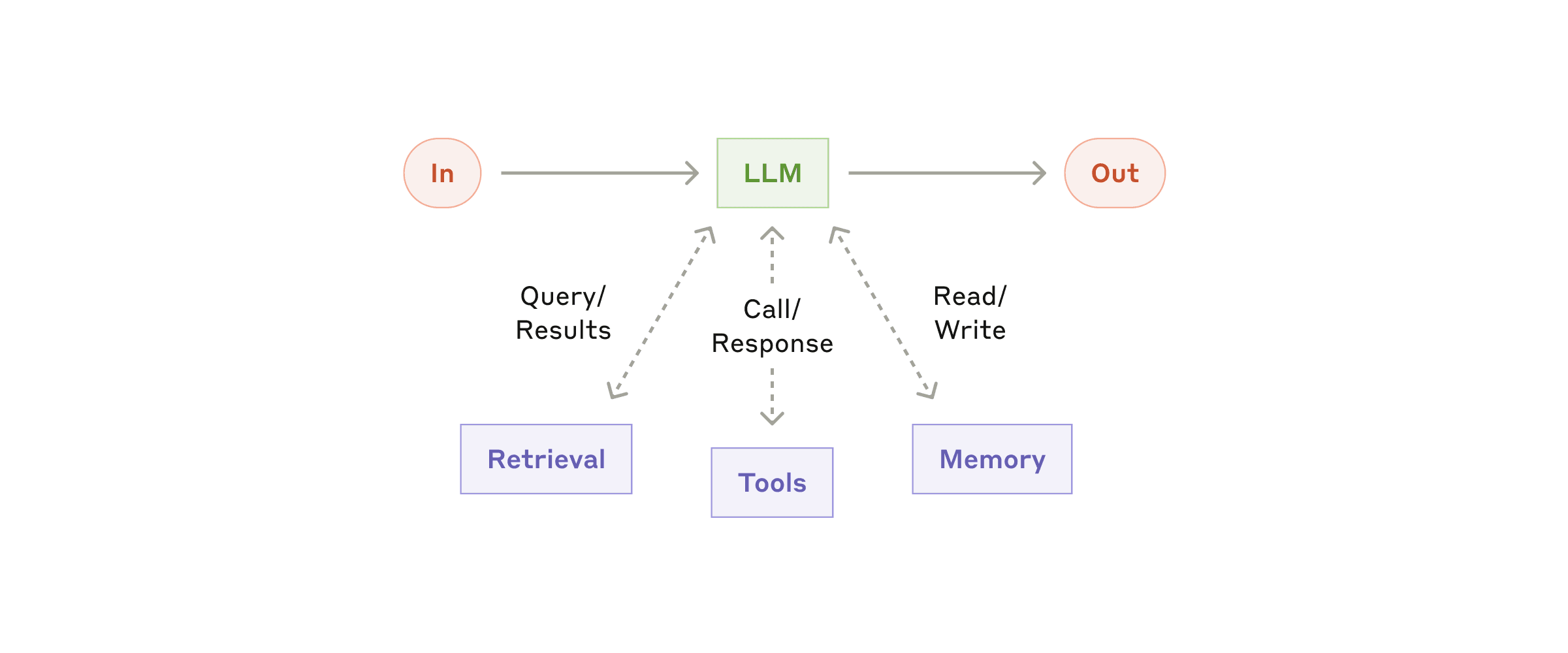
Context is the information available to Claude for the current response. Depending on the product and workflow, it can include system instructions, your messages, Claude's earlier responses, uploaded files, project instructions, retrieved content and tool results.
The context window is the maximum token budget the model can process for a request, including input and generated output. Supported sizes vary by model, product, plan and feature, so verify the current Anthropic context-window documentation instead of hard-coding one number into a workflow.
A larger window is capacity, not guaranteed attention or correctness. Relevant facts can still be overlooked, conflict with other material or become hard to distinguish inside noisy context. Improve context quality by:
- stating the task and success criteria clearly;
- providing authoritative source material;
- separating instructions from reference data;
- naming which sources take precedence;
- removing irrelevant or duplicated material;
- asking for evidence before conclusions; and
- starting a fresh conversation when accumulated history no longer helps.
Context is also a security boundary. Connected content may contain prompt injection or sensitive information. Supply only information the task is authorised to use, and treat instructions found inside documents or web pages as untrusted data.
Does a large context window mean Claude remembers everything permanently?
No. A context window is the bounded information available for a particular request. It is not guaranteed recall, permanent memory or evidence that every included detail influenced the answer.
Good first use cases
Start with work where a person can review the result:
- summarising a non-sensitive document;
- drafting an outline, email or project brief;
- comparing options against stated criteria;
- extracting themes or action items from supplied text;
- generating questions, alternatives or test cases; and
- transforming content into a table, checklist or another format.
Avoid delegating final authority for medical, legal, financial, safety or employment decisions. Claude can support thinking, but accountability remains with the person and organisation using it.
Why should a first Claude task be easy for a human to review?
Because generated output can sound confident while being incomplete or wrong. A reviewable task lets you compare the result with source material and learn Claude's behaviour without transferring final authority.
2. Write prompts as clear briefs
A strong prompt is less like a search query and more like a compact creative brief. Claude needs to know the outcome, relevant context, audience, constraints and definition of a good result.
Use this five-part pattern:
- Outcome: the job to be done.
- Context: facts and material Claude should use.
- Audience: who will read or act on the response.
- Constraints: length, tone, exclusions, format and boundaries.
- Success criteria: how you will judge the output.
Act as an operations analyst.

Outcome: turn the meeting notes below into an action plan.
Audience: a delivery team that was not in the meeting.
Constraints: use only the supplied notes; do not invent owners or dates.
Output: a Markdown table with Action, Owner, Due date and Open question.
Success: every commitment is captured and uncertainty is clearly labelled.

<meeting_notes>
[Paste the notes here]
</meeting_notes>
Tags such as <meeting_notes> are not magic, but they clearly separate instructions from source content. For long inputs, put the material inside labelled sections and state which sections Claude may rely on.
Ask for uncertainty, not confidence
3. Control structure, examples and iteration
Do not try to create a perfect prompt in one attempt. First request a useful draft, inspect where it misses the mark, then give targeted revision instructions. Each revision should name the problem and the desired change.
Weak feedback says “make it better”. Strong feedback says: “Reduce this to 180 words, move the recommendation to the opening paragraph, preserve the three risks and replace jargon with language suitable for a small-business owner.”
Examples are especially useful when format or voice matters. Provide one short representative example and explain which characteristics to follow. Do not include private material simply because it is a convenient example.
Create a reusable quality rubric
Before asking Claude to produce an important deliverable, define three to five checks. A customer email might need to be accurate, concise, empathetic, action-oriented and consistent with brand voice. Ask Claude to self-check against the rubric, then perform your own review.
When is an example more helpful than another paragraph of instructions?
When the desired structure, tone or level of detail is difficult to describe precisely. The example should be representative, paired with explicit criteria and safe to share.
4. Analyse documents without losing the evidence
Claude can help interrogate reports, policies, notes and structured text. The important discipline is to separate what the source says from Claude's interpretation.
Use a staged workflow:
- describe the question you are trying to answer;
- attach or paste the authorised source material;
- ask for direct evidence or page references where possible;
- request a separate section for interpretations and open questions; and
- verify important claims against the original document.
For multiple documents, give each a short name and ask Claude to identify agreement, contradiction and missing evidence. If a source may be out of date, include its publication date and ask Claude to flag time-sensitive conclusions.
Compare Policy A and Policy B only from the supplied files.
Return: shared requirements, conflicts, gaps and five questions for the owner.
For every claim, identify the source document and section.
If evidence is absent, write “not found in supplied sources”.
Evidence before elegance
5. Turn recurring work into a Claude Project
Projects provide a dedicated workspace where related conversations and knowledge can be organised around an ongoing body of work. Availability and limits depend on the current Claude plan, so check Anthropic's Projects guidance before designing a process around them.
A useful Project has:
- a narrow purpose, such as “monthly product release communications”;
- stable instructions describing audience, voice and boundaries;
- approved reference material rather than an unmanaged document dump;
- a naming convention for conversations; and
- an owner who reviews and refreshes the knowledge.
Project instructions should describe enduring rules. Put task-specific details in the individual conversation. This distinction keeps the workspace maintainable and reduces contradictions.
Discover and download Claude Skills
Claude Code Skills are folders containing a SKILL.md file and, optionally, scripts, references and other resources. Claude discovers project Skills from .claude/skills/ and personal Skills from ~/.claude/skills/. Plugins can also bundle Skills. Read Anthropic's current Claude Code Skills guide before installing anything, because supported fields, locations and invocation controls can change.
Start with Anthropic's official Agent Skills repository. It includes example Skills, document Skills, a template and the Agent Skills specification. The following independent directories can help you find more community-created Skills:
| Directory | What it is useful for |
| --- | --- |
| Skills.sh | An open Agent Skills catalogue with topic, agent, official-source and audit views, plus repository-based installation instructions. |
| SkillMD.ai | A searchable community directory for SKILL.md files with rankings, creators, tutorials and a Skill generator. |
| SkillsMP | A large index of public GitHub SKILL.md files organised by task, creator, occupation and source repository. |
| Claude Code Marketplace | A Claude-focused directory with categories, popularity sorting and an official-only filter. |
| AgentSkill.sh for Claude Code | A Claude Code-specific catalogue with quality and security audit indicators and its own optional installer. |
| Skillselion | A combined directory for Agent Skills, plugin marketplaces and MCP servers. Check the item type before installing. |
| ClaudSkills | A Claude Code Skills catalogue with downloads and an optional desktop installer. |
| AgentSkill.space | A multi-agent directory covering Claude Code, Cursor, Codex and other compatible tools. |
| FindSkills.co | A smaller curated catalogue organised by profession, with source and ZIP installation options. |
| PolySkill | A cross-agent Skills and plugins marketplace with its own installation workflow. |
Directory size, rankings, audit labels and availability change frequently. A listing, popularity score or “official” filter is useful evidence but is not a security guarantee. Prefer the original maintainer's repository, confirm the licence and recent maintenance, and compare the downloaded files with the source.
Before installing a third-party Skill:
- Read the complete
SKILL.md, including frontmatter and linked files. - Inspect every bundled script, executable, dependency and network request.
- Check the publisher, source repository, licence, commit history and open security reports.
- Reject instructions that request secrets, disable safeguards, hide activity or run unexplained destructive commands.
- Install at project scope first, use a disposable repository and grant only the tools and permissions the Skill genuinely needs.
- Trigger the Skill with a harmless example, inspect the resulting commands and files, then remove it if its behaviour differs from its description.
For a reviewed standalone Skill, copy the complete Skill folder—not only SKILL.md—into .claude/skills/<skill-name>/ for one project or ~/.claude/skills/<skill-name>/ for your user account. If the source is a Claude Code plugin marketplace, follow Anthropic's plugin discovery and installation guide. Third-party one-line installers are specific to their directory; inspect what the command downloads and changes before running it.
Does a high install count or marketplace security score make a Skill safe to run?
No. These signals can help prioritise review, but they do not prove the current downloaded files are safe. Inspect the source, scripts, dependencies, permissions and publisher, then test the Skill with low-risk input in a disposable project.
6. Extend Claude Code with Plugins
A Claude Code plugin is a reusable package of extensions. One plugin can combine Skills, specialised agents, Hooks, MCP servers, language-server configuration and executable utilities, allowing a tested capability to be installed and updated as one unit. Use a plugin when the capability should travel across projects or teams; keep an experiment in a standalone .claude/ configuration until it is stable enough to share.
Understand the plugin mental model
Think of a plugin as the packaging and distribution layer, not as another name for a Skill or connector. A Skill teaches Claude how to perform work, an MCP server provides access to external operations or data, and a Hook reacts at a lifecycle event. A plugin can bundle any of these components behind one versioned identity and namespace.
While watching, note the distinction between an individual extension and the plugin that packages extensions together. Afterwards, describe one workflow that genuinely benefits from a bundle and one that should remain a small project-specific Skill.
Discover, install and review plugins
The official Anthropic marketplace is available through Claude Code's /plugin interface. Adding another marketplace only registers its catalogue; it does not install every plugin. Install one reviewed plugin at an appropriate scope:
- user for a trusted capability you need across projects;
- project for a team-approved plugin recorded in
.claude/settings.json; or - local for a project-specific personal installation that should remain uncommitted.
For example, /plugin install github@claude-plugins-official installs the GitHub integration from Anthropic's official marketplace. Run /plugin, inspect the Installed and Errors tabs, and use /reload-plugins after changing plugins in an active session. Confirm current commands and scopes in Anthropic's plugin discovery guide.
Plugins are trusted code and can include scripts, Hooks and MCP servers that operate with your account's permissions. Before installation, inspect the publisher, repository, licence, manifest, component directories, dependencies, network access and requested credentials. Prefer a disposable repository and the narrowest useful scope for the first test.
Does adding a plugin marketplace install or trust every plugin in it?
No. Adding a marketplace registers a catalogue. You still choose individual plugins to install, and each plugin and its source require a security review.
Build and test a minimal plugin
A distributable plugin keeps its manifest in .claude-plugin/plugin.json; component directories such as skills/, agents/ and hooks/ belong at the plugin root, not inside .claude-plugin/. This minimal structure packages one Skill:
website-review-plugin/
├── .claude-plugin/
│   └── plugin.json
└── skills/
    └── website-review/
        └── SKILL.md
The manifest supplies a stable name, description and version. The Skill should state when it applies, what inputs it needs, its review steps and the evidence expected in its output. Test the directory locally with Claude Code before publishing it or adding it to a marketplace.
Package only proven behaviour
Continue with Anthropic's plugin creation guide, complete plugin reference and marketplace guide.
7. Build deliverables with Artifacts
Artifacts give substantial outputs—such as documents, code, diagrams or interactive content—a dedicated workspace beside the conversation. This makes the deliverable easier to inspect and refine. See Anthropic's current Artifacts guide for supported capabilities.
Ask for an Artifact when the output is something you will continue shaping. Begin with the content and acceptance criteria, then iterate in controlled passes: structure, accuracy, usability and polish.
For example, request a one-page onboarding guide with required sections, target audience, reading level and source constraints. After the first version, ask to modify only the section that needs work. Broad rewrites can accidentally remove details you already approved.
8. Verify outputs and use Claude safely
Fluent language is not proof. Build verification into the workflow with the FACTS check:
- F — Fit: does the response answer the actual brief?
- A — Authority: are claims grounded in approved, credible sources?
- C — Currency: could facts, product features or regulations have changed?
- T — Traceability: can important statements be connected to evidence?
- S — Safety: does the output expose data, create harm or exceed appropriate authority?
Never assume a consumer AI tool is authorised for confidential, personal or regulated data. Follow your organisation's policies, contract terms and data classification rules. Australian organisations should also consider the Office of the Australian Information Commissioner's privacy guidance when personal information is involved.
If Claude needs current facts, provide an authoritative current source or use an approved research process, then verify the citations. If a claim cannot be checked, label it as an assumption or remove it.
Does asking Claude to check its own answer replace human verification?
No. Self-checking can reveal some gaps, but it uses the same model and context that produced the answer. A person should verify important claims against independent, authoritative evidence.
9. Build your repeatable Claude workflow
Your final goal is not a clever prompt. It is a documented workflow that consistently produces a useful result with appropriate controls.
Create a one-page workflow card containing:
- Purpose: the business outcome and intended user.
- Inputs: approved sources and prohibited information.
- Prompt: the reusable brief and output structure.
- Review: quality rubric and responsible reviewer.
- Escalation: conditions that require expert advice or rejection.
- Storage: where approved outputs and versions belong.
- Measure: time saved, defects found and user usefulness.
Run the workflow on three representative cases before adopting it. Include one difficult or incomplete case. If different reviewers reach different conclusions, improve the rubric rather than hiding the disagreement.
Add deterministic automation with Claude Code Hooks
Claude Code Hooks run at defined lifecycle events, such as before a tool call, after a successful edit, when a permission request appears or when a session stops. They are useful when an action must happen predictably rather than depending on Claude to remember an instruction. Typical uses include running a formatter after edits, checking a command before execution, recording an audit event or notifying a person when input is required.
The mental model has three layers:
- Event: choose when the Hook runs, such as
PreToolUse,PostToolUseorStop. - Matcher: narrow the event to relevant tools, such as
Edit|Write. - Handler: choose what runs. Current handler types include commands, HTTP endpoints, MCP tools, prompts and agents.
Scope matters. Put team-approved project Hooks in .claude/settings.json, personal project Hooks in .claude/settings.local.json, or user-wide Hooks in ~/.claude/settings.json. Use Claude Code's /hooks menu to inspect which Hooks are active and where each one came from. Confirm the current schema and event behaviour in Anthropic's Hooks guide and Hooks reference.
Start with a low-risk project Hook in a disposable repository. This example runs the project's existing lint command after Claude successfully edits or writes a file:
{
  "hooks": {
    "PostToolUse": [
      {
        "matcher": "Edit|Write",
        "hooks": [
          {
            "type": "command",
            "command": "npm run lint",
            "timeout": 120
          }
        ]
      }
    ]
  }
}
Run npm run lint yourself before installing the Hook, then make one harmless edit and inspect the Hook result. A command Hook runs with your user account's permissions, so review every command, validate untrusted input, protect secrets and sensitive paths, use the narrowest matcher and avoid destructive automation. Hooks add deterministic checks; they do not replace Claude Code permissions, version control, tests or human review.
Watch for the relationship between lifecycle events, settings and the scripts that receive Hook input. The interface and available events may have expanded since publication, so use the current Anthropic reference for exact configuration.
When should you use a Hook instead of another instruction in CLAUDE.md?
Use a Hook when an action must run at a specific lifecycle event, such as checking every successful edit. Use CLAUDE.md for contextual guidance Claude should reason about. A Hook is deterministic automation and can execute with your user permissions, so it requires stricter review and testing.
Final readiness check
- I can explain the task, audience and risk.
- My prompt defines a clear outcome and success criteria.
- Source material is authorised, current and traceable.
- Claude is not making the final high-impact decision.
- A named person reviews important claims and deliverables.
- The successful workflow is documented and maintainable.
The durable skill
Continue with Anthropic's getting started resources, learning hub and current documentation. Revisit this course whenever you turn a new one-off task into a repeatable workflow.
10. Continue learning and test your skills
How do you know a video topic has become a usable skill?
You can reproduce the outcome with a different example, explain the important decisions, verify the result and recognise when the workflow should not be used.