
Cursor is an AI-powered code editor that can complete code, make focused edits and operate as an agent across a repository. The speed is useful; the durable skill is learning how to give it the right context, constrain the work and verify every change.
You will learn
- Use Tab, Inline Edit and Agent effectively
- Provide precise intent and codebase context
- Plan controlled multi-file changes
- Create maintainable project rules
- Review, test and secure generated code
Choose how you want to learn
For every topic, watch the concept video, follow the hands-on demonstration or jump directly to the corresponding written documentation below.
Learning topic 01
Cursor 3 orientation
Learning topic 02
Beginner editor workflow
Learning topic 03
Cursor 2 workflow foundations
Learning topic 04
Current interface and capabilities
Learning topic 05
AI coding crash course
Learning topic 06
Comprehensive beginner practice
Learning topic 07
Getting productive safely
Learning topic 08
No-code and rapid prototyping
Learning topic 09
Working in large codebases
Learning topic 10
Building an application
Learning topic 11
Context and full-stack workflow
Learning topic 12
Agent techniques
Learning topic 13
Zero-to-hero workflow
Learning topic 14
Professional Cursor practice
Learning topic 15
Rules agents skills and MCP
Learning topic 16
Power-user techniques
Learning topic 17
Workflow patterns
Learning topic 18
How Cursor is evolving
Learning topic 19
Vibe coding with controls
Learning topic 20
Agent scale and architecture
Learning topic 21
Modes and deliberate tool choice
Learning topic 22
AI coding quality
Learning topic 23
Installation and setup
Learning topic 24
Beginner coding guide
Learning topic 25
Software factory capstone
This course uses a small existing project as the training environment. Work on a branch, begin with a clean working tree and choose code you can safely inspect and test. Cursor changes frequently, so refer to the linked official documentation for current controls and plan availability.
1. Understand the Cursor workflow
Cursor combines familiar editor features with three complementary AI interactions:
- Tab predicts the next code change while you type.
- Inline Edit applies a focused instruction to selected code.
- Agent can explore the repository, edit several files and run tools.
The official quickstart introduces all three. Use the least autonomous tool that comfortably fits the task: Tab for local completion, Inline Edit for a bounded transformation and Agent for work that requires investigation or coordinated changes.
Video lesson: Cursor beginner walkthrough
Why not use Agent for every coding task?
Agent is valuable for complex work, but a focused tool creates a smaller change surface. Smaller changes are generally faster to understand, review and reverse.
2. Prepare a safe project workspace
Before asking an agent to edit code, establish a recoverable baseline. Confirm the project builds, understand the test command and create a dedicated Git branch. Read repository instructions such as README.md, AGENTS.md and contribution guides yourself before assuming the agent interpreted them correctly.
Use this pre-flight checklist:
- Confirm you are in the intended repository and branch.
- Record existing uncommitted changes; do not let generated work overwrite them.
- Run the smallest relevant test or build command.
- Identify sensitive files, secrets and production systems that are out of scope.
- Define how you will inspect and reverse the change.
Never paste credentials into a prompt or commit them to rules. Treat terminal commands, package installations, migrations and external actions as meaningful operations that need deliberate review.
Git is part of the AI workflow
3. Give Cursor intent and state context
Cursor's context guide distinguishes between intent context—the outcome you want—and state context—the relevant reality of the codebase. Strong tasks provide both.
Goal: Add validation to the newsletter form.

Current behaviour:
- The form submits an email string to /api/newsletter.
- Validation currently happens only on the server.

Relevant context:
- @src/components/NewsletterForm.tsx
- @src/app/api/newsletter/route.ts
- @src/lib/validation.ts

Constraints:
- Reuse the existing schema library.
- Preserve server-side validation.
- Do not change the API response shape.

Acceptance criteria:
- Invalid email is announced accessibly before submission.
- Existing tests pass and new edge cases are covered.
Use precise file, folder or symbol references when you know what matters. More context is not always better: irrelevant files consume attention and can pull the solution towards unrelated patterns. Cursor's working with context guide explains explicit references and contextual trade-offs.
4. Plan before editing
For multi-file work, separate investigation from implementation. Ask Cursor to inspect the repository and return a plan containing affected files, assumptions, risks, test strategy and open questions. Explicitly say not to modify files during this phase.
A useful plan should explain why each file changes and how success will be verified. Reject plans that depend on invented APIs, replace established patterns without justification or bundle unrelated refactoring into the feature.
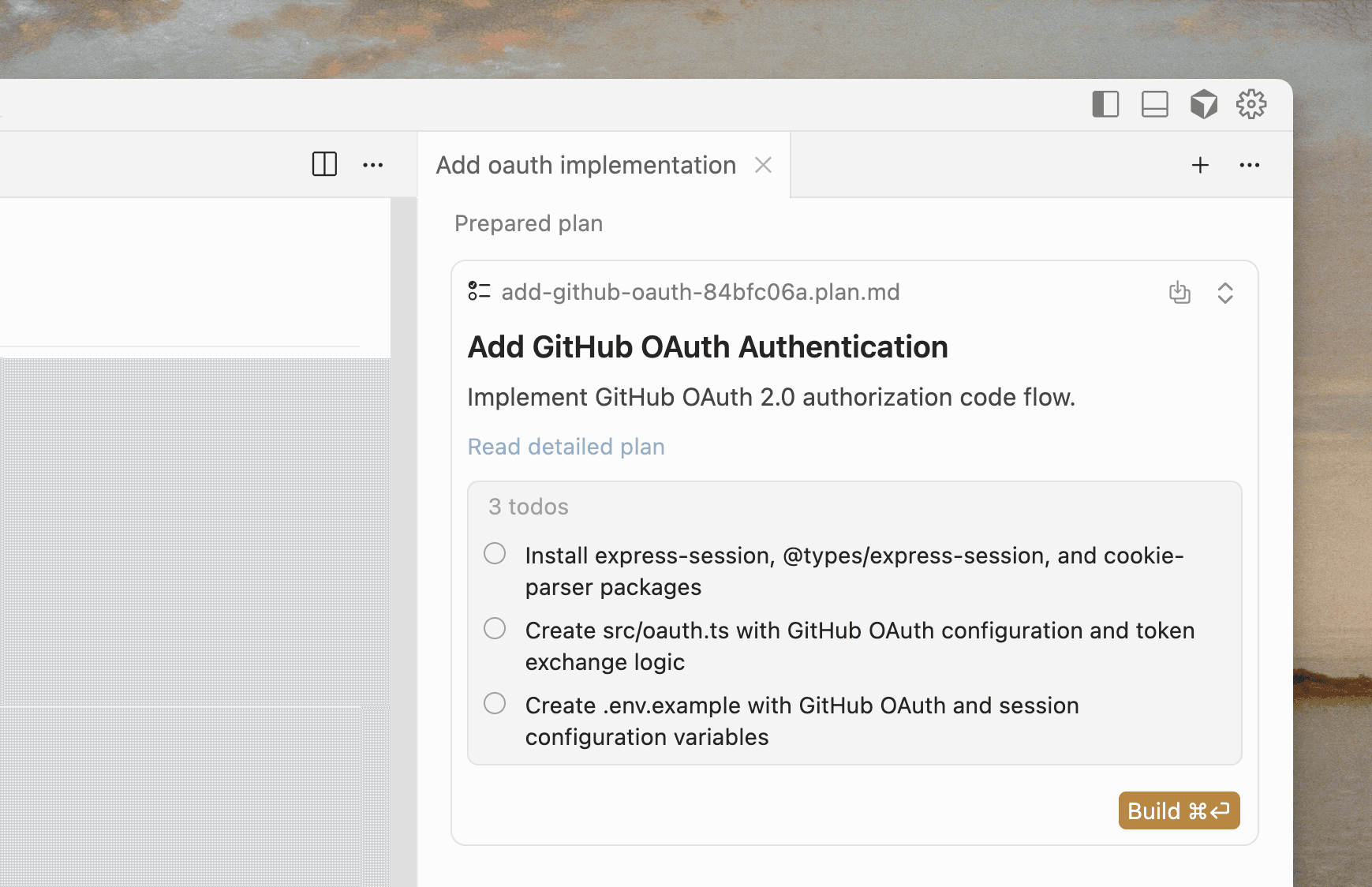
When implementation starts, give Cursor the approved plan and ask it to stop if reality differs. This is particularly important for migrations, authentication, payments, permissions and infrastructure.
What should happen when implementation reveals that the approved plan is wrong?
Pause, report the new evidence and revise the plan. Silently improvising can expand scope and invalidate the original risk and test assessment.
5. Use Agent for bounded implementation
Agent can search, read files, edit code and run terminal commands. Cursor documents these capabilities in its Agent tools reference. Autonomy is most productive when the task has a clear boundary and observable completion conditions.
Break large features into vertical slices. Instead of “build authentication”, start with “add a server-side session reader using the existing library, cover valid, expired and missing sessions, and do not change UI routes”. Review that slice before moving forward.
Good implementation prompts name:
- files or subsystems that are in scope;
- behaviour that must remain unchanged;
- required tests and validation commands;
- actions requiring approval; and
- the expected handoff, including a concise change summary.
Ask for evidence of completion
6. Encode stable knowledge with project rules
Cursor rules provide persistent instructions to Agent and Inline Edit. Project rules live in .cursor/rules, can be version controlled and may be scoped to relevant paths. The official rules documentation recommends focused, actionable rules with concrete examples.
Use rules for stable knowledge that future tasks repeatedly need:
- canonical architecture and module boundaries;
- commands for tests, linting and builds;
- security or accessibility requirements;
- examples of preferred patterns; and
- instructions for generated migrations or external actions.
Do not turn a rule into an encyclopedia. Split unrelated concerns, scope rules where possible and remove guidance that the codebase already makes obvious.
---
description: Testing conventions for API routes
globs: src/app/api/**/*.ts
alwaysApply: false
---

- Test authentication failures before success paths.
- Mock external services at the adapter boundary.
- Run: npm test -- api
- Never use production credentials or endpoints in tests.
7. Review, test and secure generated code
Treat AI-generated code exactly like an external contribution. Read the full diff and inspect adjacent behaviour that may be affected. Generated code can compile while introducing insecure defaults, missing error handling, inefficient queries or tests that only prove the implementation agrees with itself.
Use the DIFFS review:
- D — Desired behaviour: does the change satisfy the actual acceptance criteria?
- I — Integration: does it follow repository architecture and public contracts?
- F — Failure modes: are invalid input, errors and partial states handled?
- F — Footprint: did unrelated files, dependencies or configuration change?
- S — Security: are permissions, data exposure, secrets and unsafe execution addressed?
Run focused tests first, then broader type, lint and build checks appropriate to the risk. Inspect newly added dependencies and lockfile changes. For UI work, test keyboard use, responsive layouts and error states—not only the happy-path screenshot.
Why can a generated test suite still miss the real defect?
The tests may encode the same mistaken assumptions as the generated implementation. Derive important cases independently from requirements, threat models and observed failures.
8. Build your repeatable Cursor workflow
Finish by documenting a workflow your team can apply consistently:
- Select a small, testable outcome.
- Create a branch and establish a clean baseline.
- Supply intent, state context, constraints and acceptance criteria.
- Request investigation and a plan for non-trivial work.
- Approve a bounded implementation.
- Run focused and project-level checks.
- Review the complete diff with the DIFFS method.
- Commit only the intended files and record remaining risks.
Final readiness check
- I understand the repository before asking Cursor to change it.
- My task has explicit boundaries and acceptance criteria.
- I can recover the starting state with Git.
- Project rules are concise, current and safe to share.
- Commands and external actions receive appropriate review.
- Tests and human review independently verify the result.
- The final diff contains only intentional changes.
Speed needs a control system
Continue with Cursor's quickstart, context guide and agent best practices. Recheck the official documentation as features and controls evolve.
9. Continue learning and test your skills
What turns watching Cursor tutorials into engineering competence?
Reproducing each outcome in a different repository, understanding the generated diff, testing independently and being able to explain where human judgement and approval remain necessary.